
Lichii Emulator
Lichii Emulator is an experimental, open-source Nintendo Switch and Switch 2 emulator for desktop systems. Current release packages are available for Windows x86_64, Linux x86_64 and ARM64, and Apple Silicon Macs.
The latest public release checked for this page is Lichii nx2 Build 88, published on November 6, 2026. It is marked as a pre-release, which means it may still have crashes, visual errors, or game-specific problems. Android is not included in the current Build 88 downloads.
The developers are active and continue to update the project. Build 88 added performance and synchronization changes, shader and pipeline cache updates, fixes for optional FSR3 frame generation, and a game-specific Dynamic FPS add-on. Frame generation stays off by default.
The desktop app was previously connected with the Eglantine name. The move to Lichii keeps the existing Eden and Eglantine data folders and configuration keys. This helps preserve old settings, saves, and shader caches instead of moving or deleting them. You should still back up your saves before trying an experimental build.
What makes Lichii useful is its open-source code, regular development, desktop packages, detailed settings, and user documentation. The interface covers basic game-library and controller setup, while experienced users can adjust graphics, CPU, cache, add-on, and debugging options.
Whether you are a beginner or an experienced emulator user, start with the default settings. Change advanced options only when a game has a clear problem or the project documentation recommends a specific fix.
For the Lichii Emulator download, use the official website, LichiiEmulator.net. Click Download on the home page to open the download page. Choose your operating system, then click Download Latest for the correct package.
The download page should show the current build number, release date, operating system, CPU architecture, file name, file size, pre-release status, and SHA-256 checksum. Scan the downloaded file before opening it and avoid fake mirrors or repacked installers.
Keep reading to learn what Lichii Emulator is and how to use it.
Without any further ado, let’s get started:
What Is Lichii Emulator

Lichii Emulator is an experimental, open-source Nintendo Switch and Switch 2 emulator written in C++. It is made for running compatible, legally obtained game dumps on supported computer hardware.
The public repository is maintained by Zortos and other project contributors. Lichii builds on code and contributions from Eglantine, Eden, yuzu, and Sudachi. The project also credits Eglantine’s original developer, Camille LaVey.
Lichii is designed for desktop users who understand that experimental emulation may involve crashes, stutter, visual errors, or game-specific bugs.
New users can follow the basic setup flow, while advanced users can work with graphics backends, caches, mods, logs, and detailed settings.
You can use Lichii to organize and run compatible game dumps, configure controllers, install legally obtained updates and add-ons, and adjust emulation settings. Games, firmware, and decryption keys are not included. You must obtain those files legally from hardware and software you own.
The official website is LichiiEmulator.net. It provides the main download path and setup information for users. Lichii is an independent project and is not affiliated with Nintendo.
Lichii Emulator Features
Switch and Switch 2 emulation
The project is built to emulate compatible Nintendo Switch and Switch 2 software.
Open-source C++ project
The source code is public under GPL licensing, allowing developers to inspect and contribute to it.
Desktop release packages
Build 88 includes downloads for Windows x86_64, Linux x86_64 and ARM64, and macOS ARM64.
Shader and pipeline caching
Persistent shader and Vulkan pipeline caches can reduce repeated compilation work after cache data has been created.
Controller configuration
You can map a supported controller and adjust input settings from the emulator interface.
Save and settings continuity
Lichii keeps existing Eden and Eglantine data locations, including saves, settings, and shader caches.
Advanced tools and add-ons
Project documentation covers mods, updates and DLC, Amiibo, save importing, multiplayer, logs, graphics settings, and other advanced options.
Lichii does not promise that every game will start, render correctly, or maintain a fixed frame rate. Performance and compatibility depend on the game, emulator build, CPU, GPU, graphics driver, and selected settings.
How to Download Lichii Emulator?
Download Lichii Emulator from LichiiEmulator.net. Before choosing a package, check your operating system and CPU architecture.
System Requirements and Platform Notes
Windows: Windows 10 or Windows 11 on x86_64 hardware. The standard MSVC build may require the latest Microsoft Visual C++ Redistributable. The MinGW PGO build bundles its own DLLs.
Linux: A matching x86_64 or ARM64 package. The Build 88 AppImage requires glibc 2.39 or newer, such as Ubuntu 24.04, Fedora 40, Debian 13, or a current Arch installation. The tar.gz package uses system libraries such as Qt 6.
macOS: macOS 15 or newer on an ARM64 Apple Silicon Mac. The current package is not notarized, so macOS may ask you to confirm that you want to open it.
CPU: The project documentation recommends FMA support for the best experience.
GPU: The documented graphics baseline is OpenGL 4.6 or Vulkan 1.1 support.
RAM: The project does not publish a fixed minimum or recommended desktop RAM figure. Memory use varies by game and system, so check the latest release notes before downloading.
Storage: Build 88 downloads range from about 29 MB to 116 MB, depending on the operating system and package type. You also need separate space for extracted files, shader caches, firmware, updates, and legally owned games. The project does not publish one total storage requirement.
Required user files: Lichii does not include games, firmware, or decryption keys. Use only files legally dumped from hardware and software you own.
Download Steps
- Open LichiiEmulator.net.
- Click the Download button on the home page.
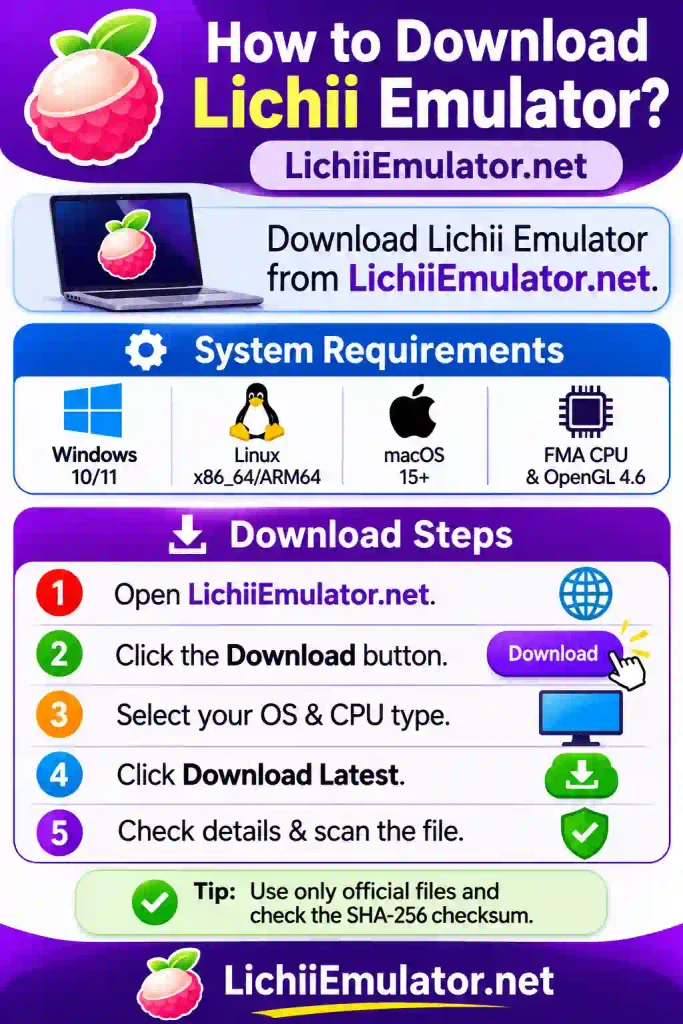
- On the download page, select your operating system.
- Choose the package that matches your CPU architecture.
- Click Download Latest.
- Check the build number, release date, file name, and SHA-256 checksum.
- Scan the file with your current antivirus or security tool before opening it.
Build 88 uses separate packages for Windows, Linux, and macOS. Do not install a package made for another operating system or CPU type. Avoid shortened links, unknown mirrors, repacked installers, and websites that ask you to install an unrelated download manager.
How to Set Up Lichii Emulator
Lichii is experimental, so back up your saves before updating the emulator or changing important settings. Use only firmware, keys, games, updates, and add-ons obtained legally from devices and software you own.
Basic Setup
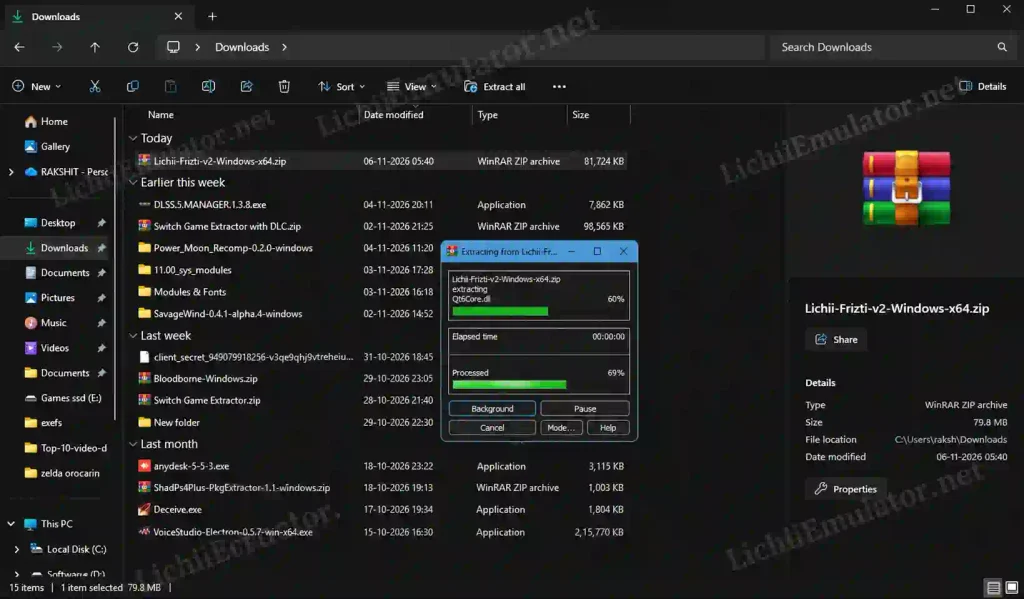
Install or extract Lichii. On Windows, extract the complete ZIP file to a normal folder. Linux users can run the correct AppImage or extract the tar.gz package. Apple Silicon Mac users can use the ARM64 DMG or ZIP.
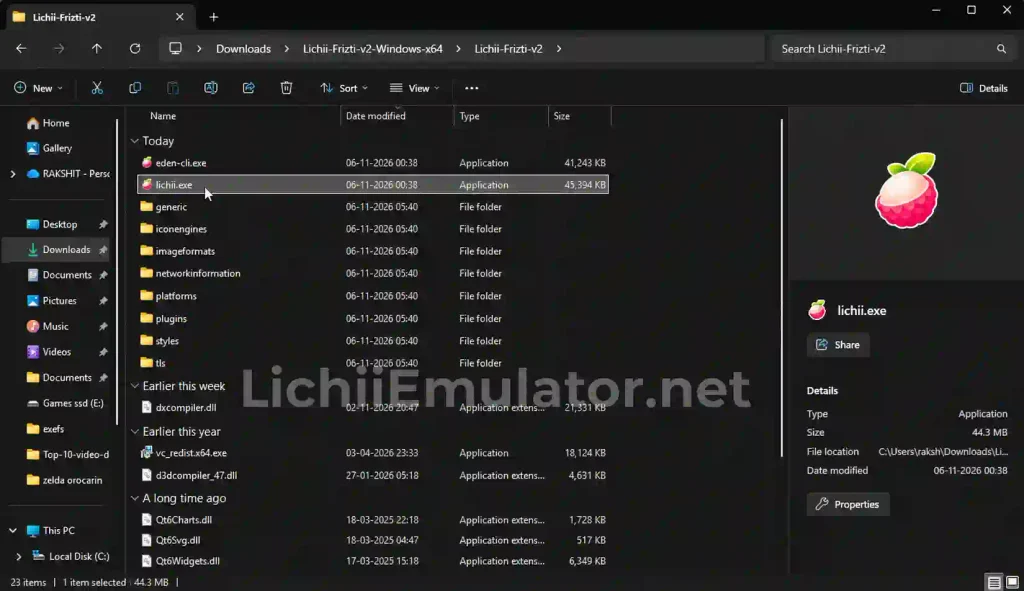
Launch the emulator. Windows users can run lichii.exe. Linux AppImage users may need to mark the file as executable before opening it.
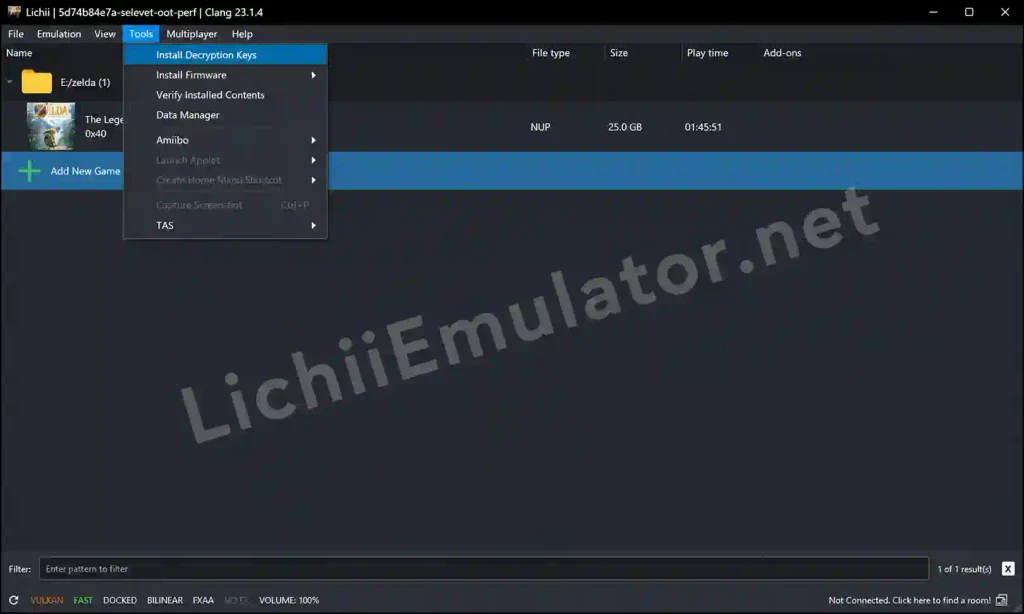
Add your legal system files. Use Lichii’s tools to install firmware and decryption keys dumped from your own console. Never download these files from unknown websites.
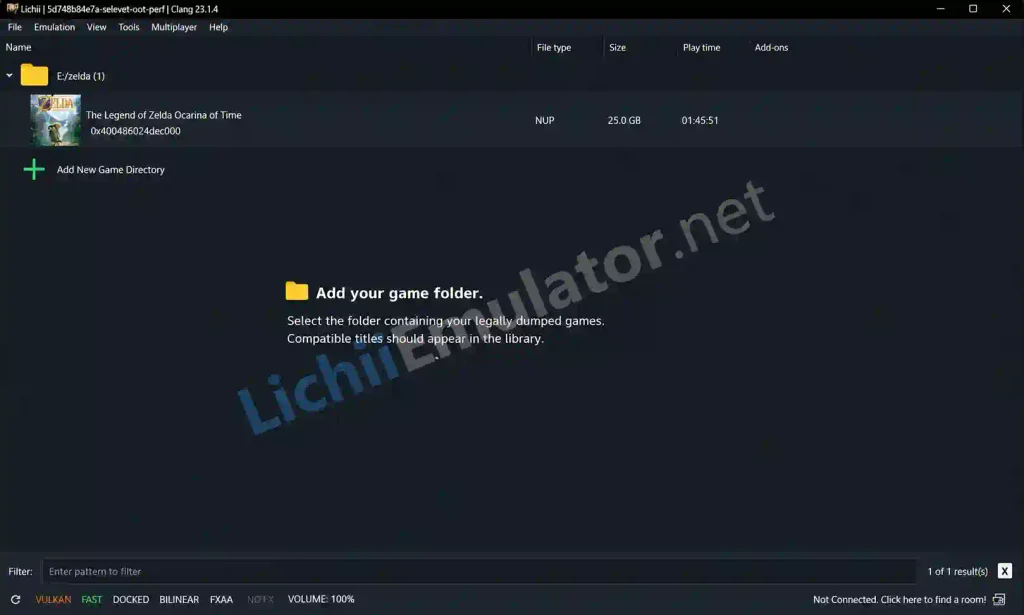
Add your game folder. Select the folder containing your legally dumped games. Compatible titles should appear in the library.
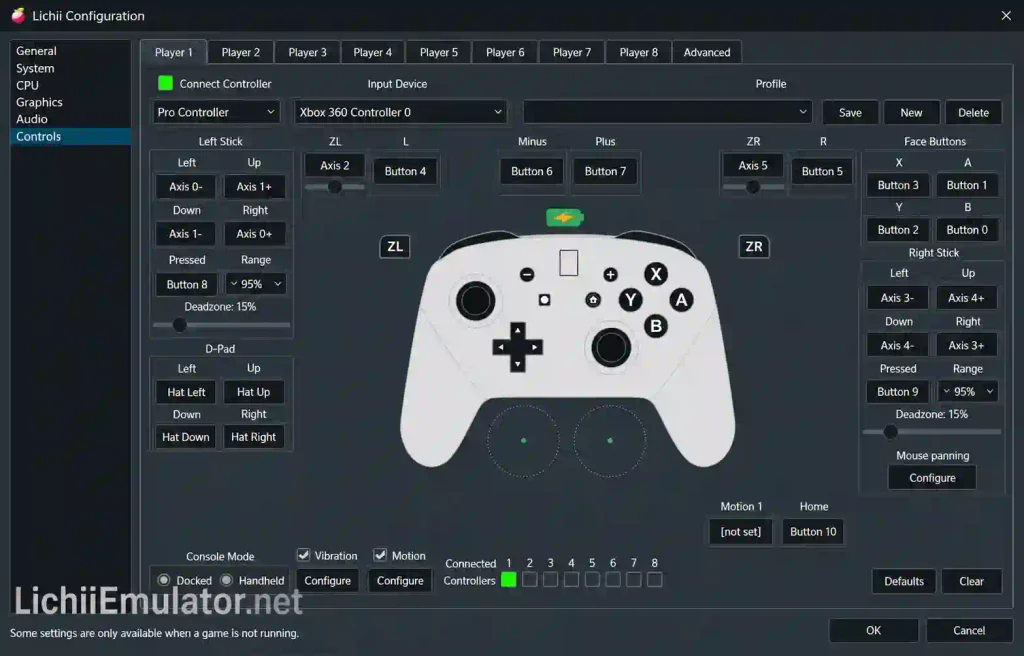
Configure your controller. Open the input settings, choose your controller, and map the required buttons.
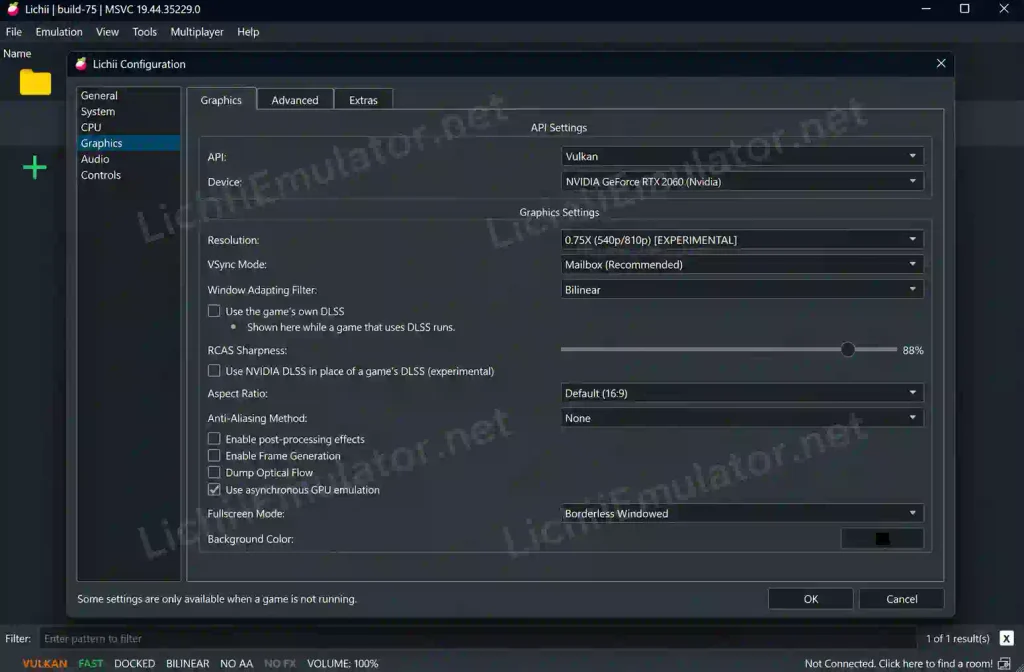
Keep the default settings first. Try to start the game before changing CPU or graphics options. This makes problems easier to identify.
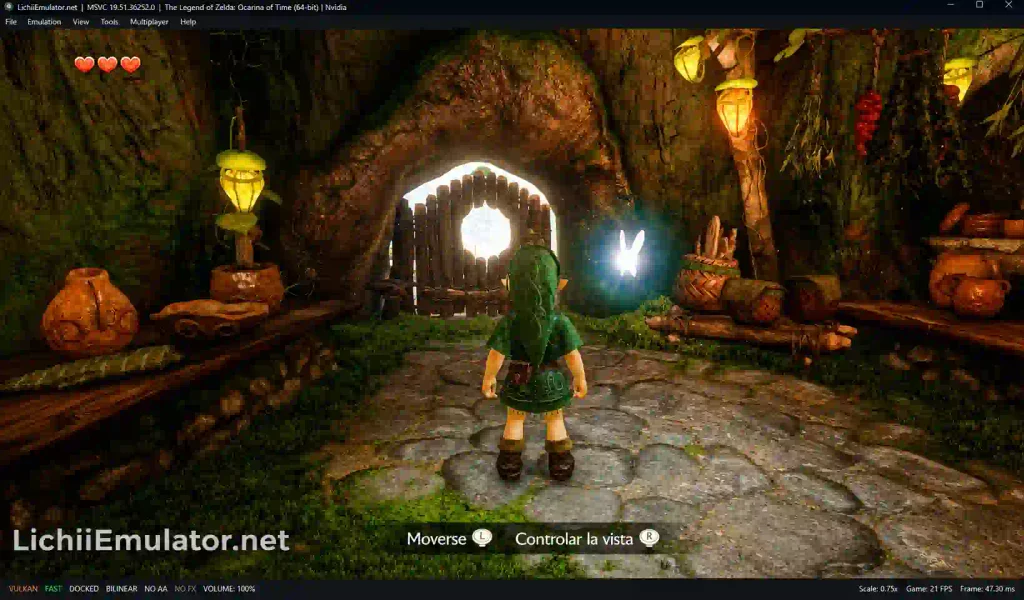
Launch the game. Double-click a title and note any error message, visual problem, or crash.
Common Problems and Solutions
Lichii does not open on Windows: Make sure you extracted the full ZIP file. If you use the standard MSVC package, install or repair the latest Microsoft Visual C++ Redistributable, restart Windows, and try again. The MinGW PGO package includes its required DLLs.
Vulkan initialization error: Update your graphics driver first. If the problem continues, try the other supported graphics backend. The project troubleshooting guide also suggests disconnecting a second monitor as a test.
Stutter during early gameplay: Shader compilation can cause temporary stutter. Keep the persistent shader and pipeline caches enabled during normal use, then test the same area again after the cache has been created.
A game crashes or has broken graphics: Return to the default settings, update Lichii and your graphics driver, and check whether the issue affects only that game. Compatibility varies, so a setting that helps one title may hurt another.
macOS blocks the app: Confirm that you downloaded the correct file from the official download path and check its SHA-256 value. Because Build 88 is not notarized, macOS may require you to right-click the app and choose Open the first time. Never bypass Gatekeeper for an unknown file.
The emulator hangs while closing: Build 88 lists a known fence-worker shutdown race that can leave the emulator waiting during shutdown. Save your progress before closing and check a newer release for a fix.
When reporting a bug, include the exact Lichii build, game version, CPU, GPU, graphics driver, settings, steps to reproduce, a screenshot, and a cleaned log. Never upload game files, firmware, keys, or private account information.
Safety and Legal Note
Download Lichii only from LichiiEmulator.net and use the package listed for your system. Check the build details and checksum, scan the file, and avoid fake mirrors.
An emulator does not give you permission to copy or download copyrighted games, firmware, keys, DLC, or updates. Use only files you legally own and dump yourself. Laws and platform terms can differ by region, so review the rules that apply to you. Using unofficial software or network features may also create account or terms-of-service risks.
FAQs
What is Lichii Emulator?
Lichii Emulator is an experimental, open-source Nintendo Switch and Switch 2 emulator written in C++. It builds on work from Eglantine, Eden, yuzu, and Sudachi. It can run compatible, legally obtained game dumps, but results depend on the game, computer hardware, graphics driver, and emulator build.
Is Lichii Emulator free?
Yes. The project README says Lichii is free and stays free, while its source code is available under GPL licensing. Donations are optional and do not provide special builds or early access. Games, firmware, and decryption keys are not included with the emulator.
Where can I download Lichii Emulator?
Download it from the official website, LichiiEmulator.net. Click Download on the home page, select your operating system and CPU architecture, then click Download Latest. Check the build number, file name, and checksum before opening the downloaded package.
Which devices support Lichii Emulator?
The current Build 88 downloads support Windows x86_64, Linux x86_64 and ARM64, and ARM64 Apple Silicon Macs. Android is not included in this release. Support does not guarantee good performance on every device because the CPU, GPU, driver, memory, and selected game all affect the result.
Is Lichii Emulator safe?
No software download should be called completely safe without checking the exact file. Use the official website, confirm the build and checksum, and scan the package with current security software. Avoid mirrors, repacks, and unrelated download managers. Back up your saves before testing any experimental build.
Is using Lichii Emulator legal?
Emulator software and copyrighted game files are separate issues, and laws vary by location. Lichii’s documentation tells users to use games and system files they obtained legally. Do not download pirated games, shared keys, or firmware. Review local law and relevant platform terms before using it.
How do I fix lag or crashes in Lichii Emulator?
Start with default settings, update Lichii and your graphics driver, and confirm that your GPU supports the required graphics API. Keep shader and pipeline caches enabled for normal use. If the problem remains, record your exact build, game version, hardware, driver, settings, log, and reproduction steps.
Lichii Emulator
Read this Lichii Emulator guide for Nintendo Switch and Switch 2 on desktop: features, download steps, setup, safety tips, and fixes for common problems.
Price Currency: USD
Operating System: Windows (64-bit), Linux, macOS 15 or later (Apple Silicon)
Application Category: Game